Supported Tools
Our MCP is under a BETA version. Tools might change until the version 1.0.0.
This page is the full reference: every tool, its arguments and its response payload. For a one-glance summary of what the MCP can do, see Bloomflow MCP.
Everything runs through one endpoint, POST https://api.YOUR_CLIENT_ID.bloomflow.com/mcp/, using the JSON-RPC 2.0 tools/call method. Your AI client picks the right tool on its own — this reference is there so you know what it is able to do, and what it will never be able to do.
Every tool is scoped to the API key you connect with. The AI never sees an item, a workflow or a metric that the key's user is not allowed to read — and the same applies to writes.
How to use the Tools
The best way to inspect what the MCP is providing is to use the MCP Inspector
Install and the MCP Inspector
Please, refer to the documentation above for more information.
Run the inspector (if you do not have it installed, it will ask you to install it)
npx @modelcontextprotocol/inspector
Your browser should open automatically at http://localhost:6274
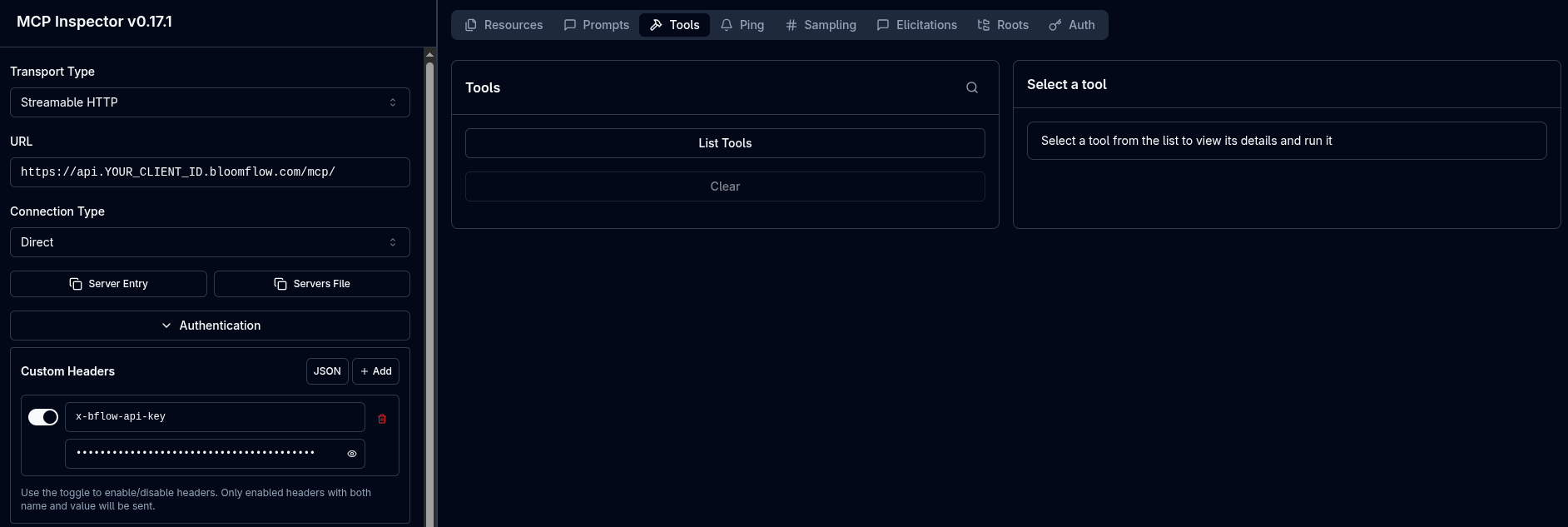
How to connect to the Bloomflow MCP
- Url -
https://api.YOUR_CLIENT_ID.bloomflow.com/mcp/ - Headers for the authorization -
x-bflow-api-key: YOUR_API_KEY
Available tools
Ten tools and one prompt, grouped by what they let your AI do. Each entry documents its arguments, a copy-pasteable request example and the shape of the response.
Search and find answers
Four tools cover the whole spectrum, from a plain question to a raw Elasticsearch query.
Understand your data model
Your platform's configuration is specific to you. These tools let the AI read it instead of guessing.
Get the numbers
The analytics tools need a personal API key: the warehouse query is signed with the typologies of the key's user. A global key is refused.
Write back
Writing is deliberately narrow for now. More actions will follow.
Prompts
The server also exposes a prompt template your AI client can offer as a one-click action.